



Most of them facing little bit difficulty while doing project setup. Because, We must to do DB connecting process, Datasource creation, schedule tasks creation process if we put setup for running project and so on. For this, we need to use project based application servers ( CF or Lucee ) user interface. But, Most of them don't like this. They are expecting above mentioned process via code. Ofcourse, CFML has cfschedule tag to create/update/run/delete schedule task files. But, we don't have an any other option to modify application server configurations via code.
Now, Lucee administrator API solved this problem. Lucee administrator API provides lot of opportunity to manipulate the Lucee administrator configurations without using lucee user interface, that can able to acheived by cfadmin tag. This tag is fully integrated with CFML and has lot of attributes to achieve our needs.
Here, We will explain, how to use cfadmin tag and will explain some of the attributes useages.
Required attributes for all operations
| Name | Description |
|---|---|
| action | The administrative action to perform. |
| type | The admin context: web or server |
| password | The admin password. |
Create/Update/Remove Datasource
Usually, for creating/updating datasource we need to login with Lucee admin and then go to datasource section. But, cfadmin tag has the facility to create/update/remove datasource without using lucee admin user interface. Using below mentioned attributes we can able to acheieve our process.
We need use same attributes for creating/updating datasources, but the small difference is, if the given datasource name is not available in lucee admin means, it will create new DSN.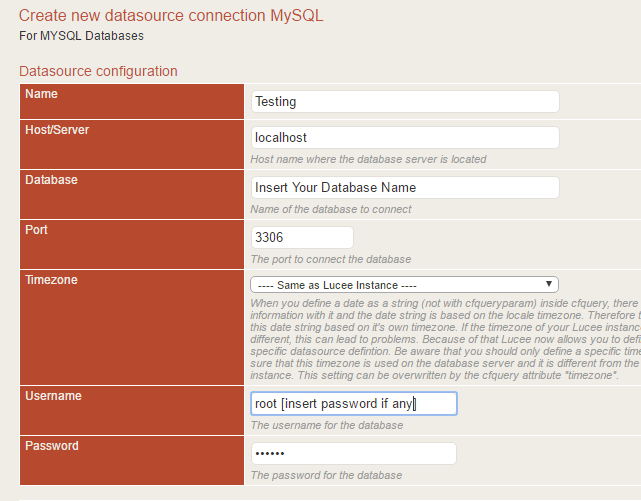
Needed Attributes & their descriptions
| Name | Description |
|---|---|
| dbdriver | Need to mention MySQL or MSSQL database driver name. For example, MSSQL - MSSQL MySQL - MySQL |
| className | Defines the name of the database driver class. For example,
MSSQL - com.microsoft.sqlserver.jdbc.SQLServerDriver MySQL - com.mysql.cj.jdbc.Driver |
| dsn | Defines the dsn for a data source |
| name | Defines the name of a data source definition |
| host | Contains the host of a database server in a data source definition |
| database | Database name |
| port | SQL server port number |
| dbusername | SQL server username |
| dbpassword | SQL server password |
| remoteClients | Every tag can contain remote clients to synchronize its settings with. It is a list of labels of in the admin defined remote clients |
Sample code for create/update Datasource
<cfadmin
	action="updateDatasource"
	type="server"
	password="password"
	dbdriver="MSSQL"
	className="com.microsoft.sqlserver.jdbc.SQLServerDriver"
	dsn="jdbc:sqlserver://{host}:{port}"
	name="dsn" <!--- give the existing name to update the dsn or it will be a new name for the dsn --->
	newName="dsn"
	host="localhost"
	database="luceetestdb" <!--- your database name --->
	port="1433"
	dbusername="your DB username"
	dbpassword="your DB password"
	remoteClients="arrayOfClients"
>
Using the above mentioned sample code, we can able to create/update datasource on lucee administrator. Here, I have mentioned DSN name dsn and new DSN name newdsn. So, the code first check dsn name is available or not. If it's available means, just do the update. If it's not available, just create a new datasource.
Sample code for remove datasource
<cfadmin
 	action="removeDatasource"
 	type="server"
 	password="Your lucee admin password"
 	name="blogdsn"
	remoteClients="arrayOfClients"
>
Sample code for get Datasource info
The cfadmin tag has the facility to list out all mentioned datasource details. Using the below mentioned code we can able to list out all the datasource info.
<cfadmin
	action="getDatasource"
	type="server"
	password="Your lucee admin password"
	name="dsn"
	returnVariable="existing"
>
Lucee server configuration
Not only create/update/remove datasource. Using cfadmin tag, we can able to manipulate Lucee server configurations also. Such as update lucee admin password, get version details, update versions, get Extension info and install new extension and so on.
Needed Attributes & their descriptions
| Name | Value |
|---|---|
| action | value - restart |
| type | Value - web or server |
| password | Lucee admin password |
| provider | url of the extension provider |
Now, we don't need to restart the lucee server manually. Instead of this, using below code can able to restart the server
Sample code for restart the lucee server
<cfadmin
 	action="restart"
 	type="server"
 	password="password"
	remoteClients="arrayOfClients"
>
Sample code for update the lucee version
<cfadmin
 	action="runUpdate"
 	type="server"
	password="Your lucee admin password"
>
Sample code for update the lucee admin password
<cfadmin
	action="updatePassword"
	type="server"
	oldpassword="password"
	newPassword="passwordf"
>
Lucee server extension configuration
You are all know, The Lucee server don't have all extensions by default. Instead of, they are create new section to install the extension whatever we need for our applications. Actaully, this is good.
So, we can able to install/update the extension using cfadmin tag.
Needed Attributes & their values
| Name | Values |
|---|---|
| action | getExtensions |
| type | web or server |
| password | Lucee admin password |
Sample code for get Extensions information
<cfadmin
 	action="getExtensions"
 	type="server"
	password="Your lucee admin password"
	returnvariable="extensionInfo"
>
<cfdump var="#extensionInfo#" label="getExtension"/>
Sample code for update the Extension
<cfadmin
 	action="updateExtension"
 	type="server"
 	password="Your lucee admin password"
 	provider="http://extension.lucee.org"
 	id="2BCD080F-4E1E-48F5-BEFE794232A21AF6" <!--- Id for jTDS extension --->
	name="jTDS (MSSQL,Sybase)" <!--- for jTDS (MSSQL,Sybase) --->
>