




Mitrahsoft
  • SERVICES
    • OUR SERVICES
      • SOFTWARE DEVELOPMENT
      • MOBILE DEVELOPMENT
      • BLOCKCHAIN DEVELOPMENT
      • SOFTWARE TESTING
      • CLOUD & DEVOPS SERVICES
      • PRODUCT DEVELOPMENT
      • OFFSHORE DEVELOPMENT
      • SOCIAL MEDIA MARKETING
      TECHNOLOGIES
      • COLDFUSION DEVELOPMENT
      • REACTJS DEVELOPMENT
      • VUEJS DEVELOPMENT
      • ANGULAR DEVELOPMENT
      • NODEJS DEVELOPMENT
      • PYTHON DEVELOPMENT
      • GOLANG DEVELOPMENT
      • GOLANG CORPORATE TRAINING
      COLDFUSION EXPERTISE
      • MURACMS EXPERTISE
      • COLDFUSION APP MIGRATION
      • COLDFUSION HOSTING & SUPPORT
      • CF LEGACY APP MAINTENANCE
      • COLDFUSION REST API
      • ECOMMERCE / SHOPPING CART SOLUTIONS
      • PRESIDECMS EXPERTISE
      MOBILE DEVELOPMENT
      • REACT NATIVE DEVELOPMENT
      • FLUTTER DEVELOPMENT
      • IONIC DEVELOPMENT
      • PHONEGAP DEVELOPMENT
  • ABOUT US
    • ABOUT MITRAHSOFT
    • OUR CLIENTS
    • TESTIMONIALS
    • PORTFOLIO
    • CAREERS
  • CONTACT US
  • BLOG
Adobe Solution PartnerLucee Solution Partner
  • OUR SERVICESSOFTWARE DEVELOPMENTMOBILE DEVELOPMENTBLOCKCHAIN DEVELOPMENTSOFTWARE TESTINGCLOUD & DEVOPS SERVICESPRODUCT DEVELOPMENTOFFSHORE DEVELOPMENTSOCIAL MEDIA MARKETING
    TECHNOLOGIESCOLDFUSION DEVELOPMENTREACTJS DEVELOPMENTVUEJS DEVELOPMENTANGULAR DEVELOPMENTNODEJS DEVELOPMENTPYTHON DEVELOPMENTGOLANG DEVELOPMENTGOLANG CORPORATE TRAINING
    COLDFUSION EXPERTISEMURACMS EXPERTISECOLDFUSION APP MIGRATIONCOLDFUSION HOSTING & SUPPORTCF LEGACY APP MAINTENANCECOLDFUSION REST API ECOMMERCE / SHOPPING CART SOLUTIONSPRESIDECMS EXPERTISE
    MOBILE DEVELOPMENTREACT NATIVE DEVELOPMENTFLUTTER DEVELOPMENTIONIC DEVELOPMENTPHONEGAP DEVELOPMENT
  • ABOUT MITRAHSOFTOUR CLIENTSTESTIMONIALSPORTFOLIOCAREERS
  • CONTACT US
  • BLOG

Install PresideCMS In Apache Without CommandBox

HomeBlogInstall PresideCMS In Apache Without CommandBox
LuceeColdBoxPresideCMS

Install PresideCMS In Apache Without CommandBox

M
Post by MitrahsoftPublished: Mar 18, 2016

About PresideCMS

Preside CMS Logo

PresideCMS is a open source product from  Pixl8 Interactive which is a UK based web development company. At this point, PresideCMS compatible only with Lucee (lucee.org). Adobe ColdFusion guys have to wait or contribute to make it compatible with ACF. PresideCMS is internally using ColdBox framework. We could install PresideCMS using CommandBox very easily, you could find the document for this here .

CommandBox installation using http://undertow.io/ as a web server, But undertow is not a viable web server option for any production level application. Most of us use Apache, IIS or nginx as a production web server. Here at MitrahSoft we use Windows as primary operating system & Apache as a primary web server. In this blog post, We explain how we configured PresideCMS in a Apache virtual host. This blog post assumes you already have Apache up and running using Lucee.

Note: The following instructions refer to a Windows server with Apache.

1. Create a virtual host in Apache with Lucee for serving CFML pages

Change virtual host configuration in your Apache vhost configuration file something like below code snippet, Configuration file will be somewhere in c:\**apache-instatlltion-path**\conf\extra\httpd-vhosts.conf

Add this new virtual host configuration in your Lucee server configuration file too, this will be somewhere in C:\**lucee-instatlltion-path**\tomcat\conf\server.xml

After changing both Lucee & Apache configuration files, please restart your Lucee & Apache services. Just place a dummy index.cfm at your webroot of virtual host to see whether your virtual host configuration working & cfm page served by lucee.
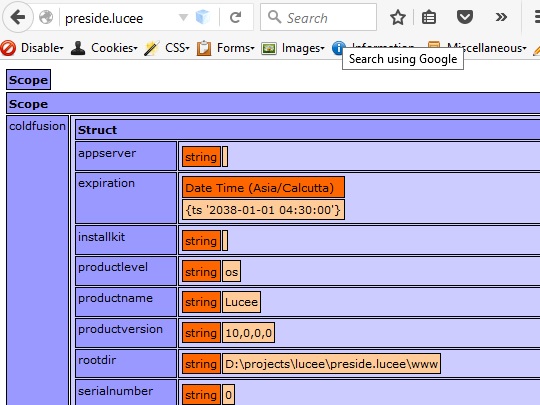
Apache With Lucee

2. Configure Tuckey URL rewrite filter in Lucee

This section is clearly explained in PresideCMS official documentation . One main point you need to take care is,

You will need to add the code which was mentioned in official documentation before the very first servlet definition

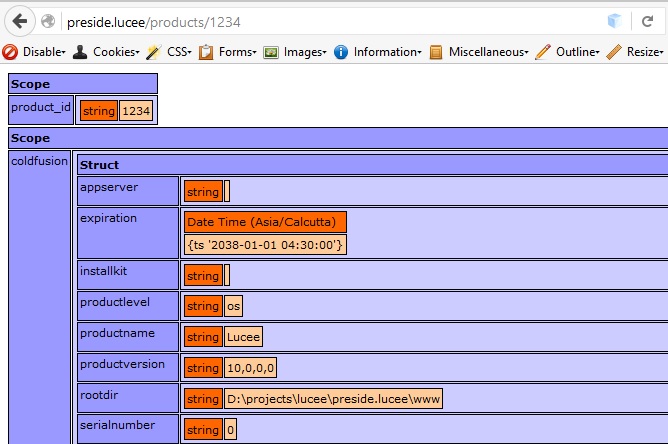
After changing the web.xml file, Please restart your Lucee service. To verify Tuckey URL rewrite is working in your Apache / Lucee virtual host, please below urlrewrite.xml file at your webroot of virtual host & try to run http://preside.lucee/products/1234 , you should get the product ID as 1234 in URL scope dump as like below screenshot.Apache With Lucee Tuckey URL Rewrite
3. Change Lucee settings in server context

PresideCMS requires the use of a couple of non-default settings in Lucee that cannot be defined in the Application's code, This setting changes clearly mentioned in PresideCMS official documentation

4. DSN & Mappings in Lucee web context

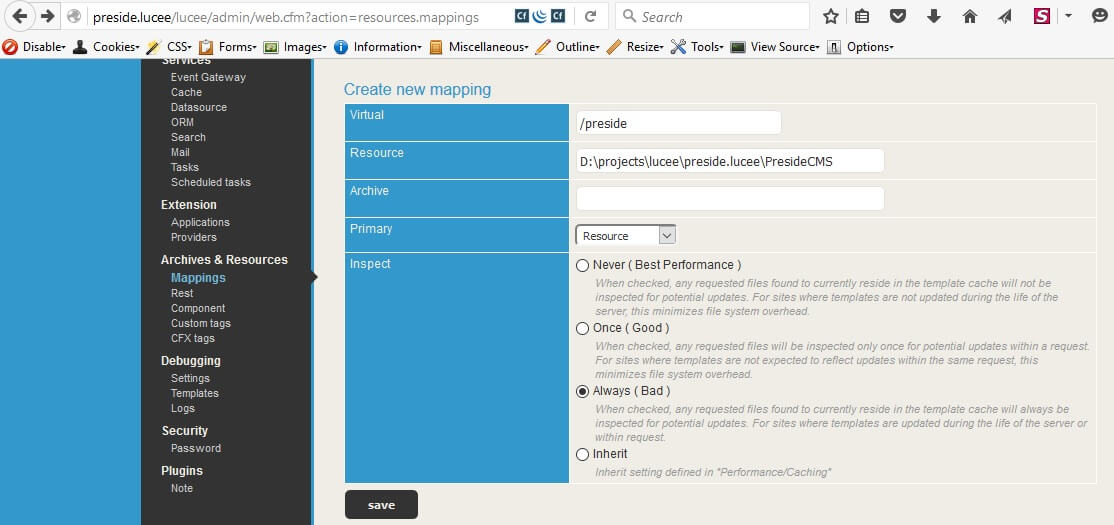
Download latest version of presideside from https://www.presidecms.com & place it outside the web root. Handy URL for the download is here. The mapping should have a logical path of /preside and point to the physical directory in which you have PresideCMS downloaded.Lucee Mapping for Preside CMS Core
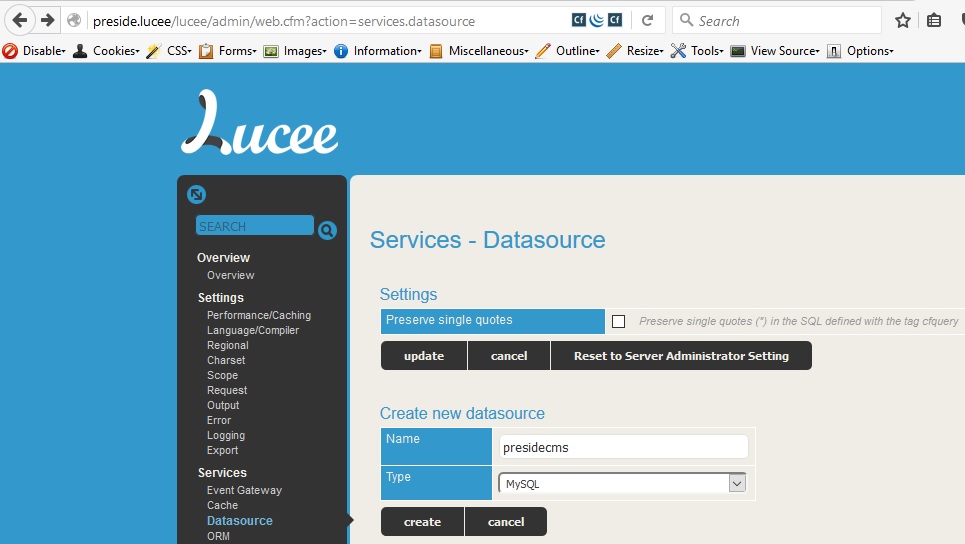
Create a empty database in MySQL/MariaDB or PostgreSQL or Microsoft SQL Server. Then create a DSN from lucee web admin as presidecms.Create Lucee Dsn for Preside CMS
5. Configuring PresideCMS site

There are few options available to start a new PresideCMS site, download any one of these based upon your preference.

  • Skeleton : brings you a very basic web site, but you can expand as per your needs.
  • Verti-Theme : offers more meat on the bone
  • Helios theme : by MitrahSoft, Offers more functionality, uses HTML5Up helios template

Delete your previous dummy index.cfm file & urlrewrite.xml from virtual host webroot, Please place downloaded theme in the web root. The basic setting for the CMS are stored in application/config/Config.cfc file. The previously created DataSource and a few other settings must be entered here as like below code snippet,


After replacing config.cfc, run http://preside.lucee/cmsadmin in your favourite browser, you could see first time set up wizard to create super admin of PresideCMS.Presidecms Firsttime Setup
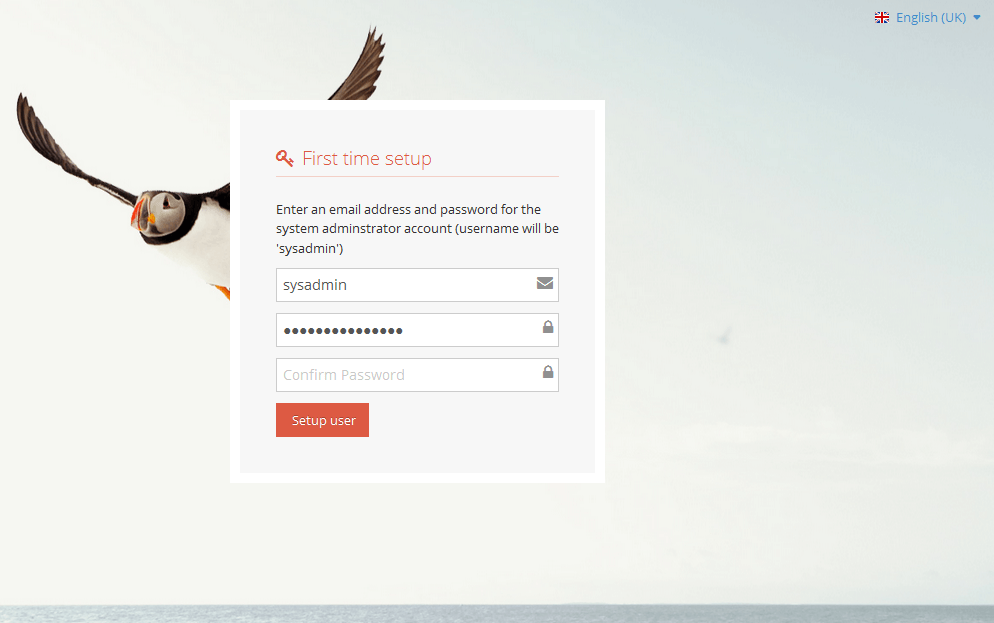
 

In the first box, enter your e-mail address. Then enter the desired password twice. Complete your installation by pressing "Setup user". You will then receive a message saying that your account is ready and you can log in. Now it is time for playing with PresideCMS awesome features. :)

Reference :

  • German article, primarily intended for netfusion.ch hosting customers.
  • PresideCMS official documentation

Tags

ADYENAMAZON-SESANDROIDAPACHEAPACHE-JMETERAWSBARCODE-SCANNERCOLDBOXCOLDFUSIONCOLDFUSION-API-INTEGRATIONCOLDFUSIONBUILDERECHARTSEVENT-GATEWAYFFMPEGFW1JQUERYJSOUPLUCEEMURACMSMURACMS-THEMENODEJSONESIGNALOSSPAYFLOW-PROPAYMENT-GATEWAYPAYPALPRESIDECMSPUPPETEERRAILORAZUNAREACTJSREACTNATIVERESTSASS-COMPILATIONSEMANTIC-UISUBLIMETEXTTINYMCETWILIOYUI-LIBRARY

Archives

JAN 20DEC 19AUG 19JUL 19JUN 19MAY 19APR 19MAR 19FEB 19JAN 19DEC 18NOV 18OCT 18MAR 16NOV 15SEP 15MAY 15MAY 14OCT 13JUN 13MAY 13APR 13MAR 13FEB 13JAN 13

Follow us

Mitrahsoft
United StatesUnited States

Hurst, Texas, United States

+1 (817) 606-8684usa-sales@mitrahsoft.com

IndiaIndia

Head Office

126G2/5, Thiru malai nagaram,
Kovilpatti - 628 501

Madurai

1/B, 2nd & 3rd floor, GV Complex,

Bye Pass Road, SS Colony,

Madurai - 625 016

Coimbatore

2nd Floor, Sri Narmadha Towers,

Murugan Nagar Rd, Thoppampatti Pirivu,

 K. Vadamadurai, Coimbatore - 641 017

+91 9092480924

business@mitrahsoft.com

ColdFusion
  • eCommerce / Shopping Cart Solutions
  • Payment Gateway Integrations
  • Shipping API Integrations
  • ColdFusion Development Services
  • REST API Development
  • MuraCMS Plugin Creation & Personalization
Technology Services
  • ReactJS Development
  • VueJS Development
  • AngularJS Development
  • NodeJS API Development
  • Python Development
  • Golang Development
  • React Native Development
  • D3.JS data Visualization
Other Services
  • Software Development
  • Mobile Development
  • Blockchain Development
  • Cloud & Devops Services

Connect with MitrahSoft

Please fill out this field

© 2026 All Rights Reserved. MitrahSoft Solutions Pvt Ltd

Home|About Us|Careers