



A TEST CASE is a set of conditions under which a tester will determine whether a system under test satisfies requirements or works correctly. The process of developing test cases can help find problems in the requirements or design of an application.
In this blog post, we will see how to write testcase in Testcafe to do end to end testing.
TestCafe is a pure node.js end-to-end solution for testing web apps. It takes care of all the stages: starting browsers, running tests, gathering test results and generating reports. TestCafe doesn't need browser plugins - it works in all popular modern browsers out-of-the-box. It allows you to easily write a functional test that inputs text, clicks buttons, and validates the results.
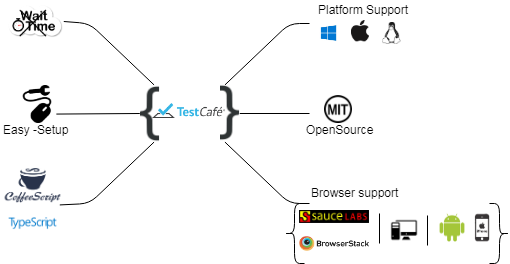
TestCafe Features
- TestCafe works on all popular environments Like Windows, MacOS, and Linux. It supports desktop, mobile, remote and cloud browsers(UI or headless).
- Test cafe setup is very simple and no need of WebDriver or any other testing software. Install TestCafe with one command, and you are ready to test.
- We can run tests in any browser without much effort (IE9+, Chrome, Firefox and Safari).
- Learning TestCafe API's is easy compared to Selenium's APIs. It exposes a minimum number of APIs to learn.
- TestCafe is free and open source framework.
- TestCafe Studio Cross Platform IDE for End to End web testing
Getting Started with TestCafe
Install dependencies:
Need to install node.js in your system, then you can install packages with the help of npm command.
TestCafe allows you to write tests using TypeScript or JavaScript (with its modern features like async/await).
npm install -g testcafe
Import testcafe selectors:
A selector is a function that identifies a web page element in the test. The selector API provides methods and properties to select elements on the page and get their state.
import { Selector } from 'testcafe';
Declare fixtures:
TestCafe tests must be organized into categories called fixtures. A JavaScript or TypeScript with TestCafe tests can contain one or more fixtures.
fixture`workflowBasicTests`
.page`${https://www.testcase.com/testModule}`;
To create a test:
Call the test function and pass the test code inside it. A test controller object t exposes the test API's methods. TestCafe tests are executed on the server side.
test('Test Case Demo: success', async t => {
  await t
  .click(Selector('#submitButton))
  .expect(Selector('#username').value).eql('')
  .expect(Selector('#password').value).eql('')
  .expect(Selector('#login_panel').find('div').withText('Invalid username or password').exists).eql(true);
});
Running the Test:
TestCafe will chosen the open browser (Chrome) to test by Default and also we can mention the browser to test the test case.
testcafe chrome fileName.js
testcafe edge fileName.js
testcafe firefox fileName.js
Fixture Hooks:
Fixture hooks are executed before the first test in a fixture is started and after the last test is finished.
fixture`beforeHook`
  .before(async t => {
})

fixture`afterHook`
  .after(async t => {
})
Test Hooks:
Test hooks are executed in each test run before a test is started and after it is finished. If a test runs in several browsers, test hooks are executed in each browser.
test
.before( async t => {
  /* test initialization code */
})

('Test', async t => { /* ... */ })

.after( async t => {
  /* test finalization code */
});
Assertions:
Fixture hooks are executed before the first test in a fixture is started and after the last test is finished.
The following assertion methods are available in TestCafe:
Deep Equal, Not Deep Equal, Ok, Not Ok, Contains, Not Contains, Type of, Not Type of, Greater than, Greater than or Equal to, Less than, Less than or Equal to, Within, Not Within, Match, Not Match.
await t
.expect(Selector('td').withText('Value').exists).eql(true);
await t
.expect(Selector('span').withText('Main').innerText).contains("Main");
Simple Test case for Login
In these we are going to see how to write the test for the login with validation using TestCafe. It describes with the step-by-step process and code implementation.
For that we have to do certain process in the TestCafe Studio, steps are given below,
TestCafe Studio Initial Process:
- Create a new fixture for the testing application in the TestCafe Studio, With the fixture name and testing site url.
- After creating the fixture successfully, we need to record a new test for our created fixture.
- TestCafe is connected to our site url which we previously given while creating the fixture.
- Now the TestCafe is ready to test our application in the browser.
- It provides a set of Browser to record our testing application like Chrome, Edge, Firefox, IE etc..
Testing the application:
- Once our site is loaded in the browser via TestCafe studio, we are ready to test our application. In this are going to test the signup and login functionalities.
- For that we must have a test case to test the application, such as we need to test the functionality in all possible ways.
- Each and every action will be recorded in TestCafe Studio whatever we did in the dom using mouse as well as with the keyboard.
- In the test case of the functionality that needs the action and its response, then only the user know the expected output for the particular action.
- For that TestCafe provides the Assertions option to find the expected elements in the DOM
- TestCafe test our application based on the id or class css selector but it must be unique one. So, the testing case can find the DOM property.
- Once we are done with recording the test case of our application, the tool is ready to generate the code format of our testing application.
- It is easy to generate the JS code by simply right click of the created fixture.
- There is an option like converted to JavaScript code, By selecting this we can generate the JS code of our tested application.
As we have previously seen that how to run our code in editor using testcafe package, Now we are going to run our tested application. The entire code for the login test case which is generated by the TestCafe is given below,
import { Selector } from 'testcafe';

    fixture`BlogTest`
    .page`https://www.surveymonkey.com/user/sign-up/`;

    test('Login Test case', async t => {
      await t
      .click(Selector('a').withText('LOG IN').nth(0))
      .click(Selector('button').withText('LOG IN'))
      await t
      .expect(Selector('##sign_in_form').find('.missing').textContent).eql("Please enter a username.")
      .typeText(Selector('##username'), 'test')
      .typeText(Selector('##password'), 'test')
      .click(Selector('button').withText('LOG IN'))
      await t
      .expect(Selector('##sign-in').find('.error-message').innerText).eql("The username or password you entered is incorrect. Please try again--and remember that passwords are case sensitive.")
      .click(Selector('##username'))
      .pressKey('ctrl+a')
      .pressKey('delete')
      .typeText(Selector('##username'), 'TestAccount_01')
      .typeText(Selector('##password'), 'testtest')
      .click(Selector('button').withText('LOG IN'))
      await t
      .expect(Selector('##userAcctTab_MainMenu').innerText).eql("TestAccount_01")
      .click(Selector('##userAcctTab_MainMenu'))
      .click(Selector('a').withText('Sign Out').nth(0))
      await t
      .expect(Selector('##hd').find('a').withText('LOG IN').innerText).eql("LOG IN");
    });
Following command is used to run the above code, it runs our test case application which is recorded using TestCafe Studio.
testcafe chrome BlogTestcaseLogin.js