


The Constant Contact API v2 is built on HTTP, uses Representational State Transfer (REST) design principles and supports JavaScript Object Notation (JSON) data-interchange format. Constant Contact REST API is simple to use, direct and concise, lightweight and optimized.
Prerequisites
- To use Constant Contact, we must have Constant Contact User Account and Constant Contact Mashery Account(Developer)
- After creation of accounts we will know API Key and Client SecretKey and need to register your application for this (Mashery)account.
- After that, application to access the Constant Contact API, it needs to have a valid Access Token for customer grants the application access to their account.
Base URL
All of API URLs start with the following base part, https://api.constantcontact.com/v2
Sample Demo
In this blog post, we are going to illustrate how to integrate Constant Contact REST API and how to get access token for accessing their application. Some sample API calls for ADD and GET the Contact List in constant contact using ColdFusion.
Application.cfc
In this file, we created a ConstantContact object in OnApplicationStart function to access the ConstantContact component's methods.
component output="false" {

	this.name = "constantContactAPI";

	public any function onApplicationStart() {
      	APPLICATION.objCC = createobject( "component", "constantContact" ).init();
	}

}
constantContact.cfc
This ColdFusion CFC has all needed functions for get access token and make simple API call for add, get Contacts from ConstantContact. We have just hardcoded API Key , Client SecretKey & RedirectUrl values in init() function. But we need pass these as arguments too. In each function, we provided proper attributes, that will explain each arguments purposes.
component output="false" displayname="ConstantContact" {

	public constantcontact function init() {

		variables.apiHost     = "https://api.constantcontact.com/v2/";
		variables.apiKey      = "xxxxxxxxxxxxxxxxxxxxxxxx";
		variables.secretKey   = "xxxxxxxxxxxxxxxxxxxxxxxx";
		variables.redirectUrl = "http://localhost:8501/CC/index.cfm";

		return this;
	}

	// Get the AccessToken here
	public any function getAccessToken(
		required string authCode
	) {

		var oAuthURL = "https://oauth2.constantcontact.com/oauth2/oauth/token";

		httpToken = New http(
			method  = "GET",
			charset = "utf-8",
			url     = oAuthURL
		);

		httpToken.addParam(
			type  = "url",
			name  = "grant_type",
			value = "authorization_code"
		);

		httpToken.addParam(
			type  = "url",
			name  = "code",
			value = arguments.authCode
		);

		httpToken.addParam(
			type  = "url",
			name  = "redirect_uri",
			value = variables.redirectUrl
		);

		httpToken.addParam(
			type  = "url",
			name  = "client_id",
			value = variables.clientKey
		);

		httpToken.addParam(
			type  = "url",
			name  = "client_secret",
			value = variables.secretKey
		);

		httpResponse = httpToken.send().getPrefix().fileContent;

		return httpResponse;
	}

	// ConstantContact List calls
	public function getLists(
		required string accessToken
	) {

		return get(
			endpoint    = "lists",
			accessToken = arguments.accessToken
		);
	}

	// get contacts from List
	public function getListContacts(
		required string listId,
		required string accessToken
	) {

		return get(
			endpoint    = "lists/" & arguments.listId & "/contacts",
			accessToken = arguments.accessToken
		);
	}

	// Performs a generic HTTP GET operation
	public any function get(
		required string endpoint,
		required string accessToken
	) {

		httpService = new http(
			url    = variables.apiHost & arguments.endpoint,
			method = "GET"
		);

		httpService.addParam(
			type  = "header",
			name  = "Authorization",
			value = "Bearer #arguments.accessToken#"
		);

		httpService.addParam(
			type  = "URL",
			name  = "api_key",
			value = variables.apiKey
		);

		httpContent  = httpService.send().getPrefix().fileContent;
		responseJson = deserializeJson(httpContent);

		return responseJson;
	}

	// To add the new contact lists
	public function addContactList(
		required string accessToken,
		required string bodyData
	) {

		return post(
			endpoint    = "lists",
			accessToken = arguments.accessToken,
			bodyData    = arguments.bodyData
		);
	}

	// To add the new contact of the specified list
	public function addContacts(
		required string accessToken,
		required string bodyData
	) {

		return post(
			endpoint    = "contacts",
			accessToken = arguments.accessToken,
			bodyData    = arguments.bodyData
		);
	}

	// Performs a generic HTTP POST operation
	public any function post(
		required string endpoint,
		required string accessToken,
		required string bodyData
	) {

		httpService = new http(
			url    = variables.apiHost & arguments.endpoint,
			method = "POST"
		);

		httpService.addParam(
			type  = "header",
			name  = "Authorization",
			value = "Bearer #arguments.accessToken#"
		);

		httpService.addParam(
			type  = "header",
			name  = "Content-Type",
			value = "application/json"
		);

		httpService.addParam(
			type  = "URL",
			name  = "api_key",
			value = variables.apiKey
		);

		httpService.addParam(
			type  = "body",
			name  = "data",
			value = arguments.bodyData
		);

		var httpServiceRequest = httpService.send().getPrefix().filecontent;
		responseJson = deserializeJson(httpServiceRequest);

		return responseJson;
	}

}
Using OAuth 2.0 to Get Access Token
The OAuth 2.0 server flow is used whenever a Constant Contact account uses your integration for the first time. The Constant Contact user must login to their account and give permission to your application to access their Constant Contact account. The application makes an Authentication Request to the Authorization server, and the server returns the access token to their application with Authorization Code and UserName on the URL. After getting the code again Application make an Access Token request using Authorization Code. Then Authentication Server has given the response with Access Token.
Authorization Request
An Authorization Request is formed as a GET call to the authorize API endpoint
https://oauth2.constantcontact.com/oauth2/oauth/siteowner/authorize
| Parameters | Values | Description |
|---|---|---|
| response_type | token | The value token tells the authentication server to send an access token to a web application. |
| client_id | Identifies the client that is making the request to the server. This value must always be set to the exact value of the API_key. | |
| redirect_uri | Authorization Server where to authentication code to send the user once access is granted. | |
| oauthSignup | true or false(default) | Use oauthSignup=true to show a sign up link on the login page.NOTE:This parameter is ignored when using newUser parameter |
| newUser | true or false(default) | Use newUser=true to send users who do not have a Constant Contact account to the account signup page. |
Example Authorization Request:
<cfset oAuthAuthorizeURL = "https://oauth2.constantcontact.com/oauth2/oauth/siteowner/authorize">
<cfoutput>
<a href="#oAuthAuthorizeURL#?response_type=code&client_id=xxxxxxxxxxxxxxx&redirect_uri=http://localhost:8501/CC/index.cfm">
	Click here to Get Access token
</a>
</cfoutput>
<cfscript>
	// Get accessToken
	accessToken = {};
	if( structKeyExists( url, "code" ) ){
		accessToken = APPLICATION.objCC.getAccessToken(
			authCode = url.code
		);
		writeDump( accessToken );
		abort;
	}
</cfscript>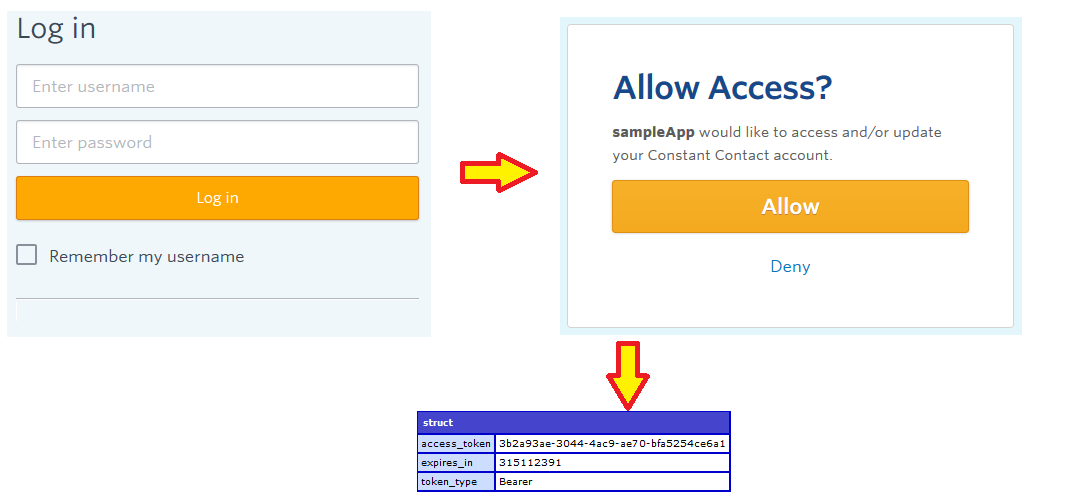
Add New ContactsList
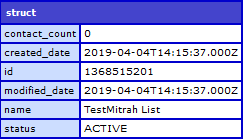
Use this endpoint to create a New Contact List. An account can have a maximum of 1000 lists. For Creation of new contact list, you must include the Name of the list, and the Status of the list.
POST: https://api.constantcontact.com/v2/lists
Parameters Used in Add New ContactsList
| Parameters | Values | Description |
|---|---|---|
| api_key | REQUIRED; The API key for the application API_key. | |
| Request Body | JSON Values of Contact List Details | JSON Request Body to add the new contact list for our the Application. |
<cfscript>
// Add a Contact List in to constantcontact using ColdFusion
bodyData = {
	"name": "TestMitrah List",
	"status": "ACTIVE"
};

addContactList = APPLICATION.objCC.addContactList(
	accessToken = '<YOUR_ACCESS_TOKEN>',
	bodyData = serializeJSON( bodyData )
);
writeDump(addContactList);abort;
</cfscript>
Example JSON Request Body
{ "name": "Hot Opportunities", "status": "ACTIVE" }
Example Response
Get ContactList
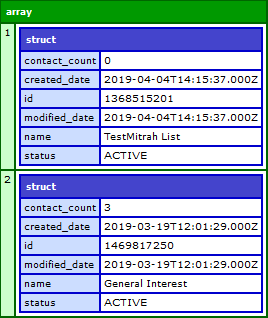
Use this endpoint to retrieve a collection of existing contact lists.GET: https://api.constantcontact.com/v2/lists
Parameters Used in Get ContactList
| Parameters | Values | Description |
|---|---|---|
| api_key | REQUIRED; The API key for the application API_key. | |
| include_list_id | true or false (default) | include_list_id=true returns the uuid formatted list_id property, which is the list unique identifier in the V3 API. Useful for migrating V2 API integrations to the V3 API. |
<cfscript>
	// Get Contact List from constantcontact using ColdFusion
	getContactList = APPLICATION.objCC.getLists(accessToken = '<YOUR_ACCESS_TOKEN>');
	writeDump(getContactList);abort;
</cfscript>
Example Response
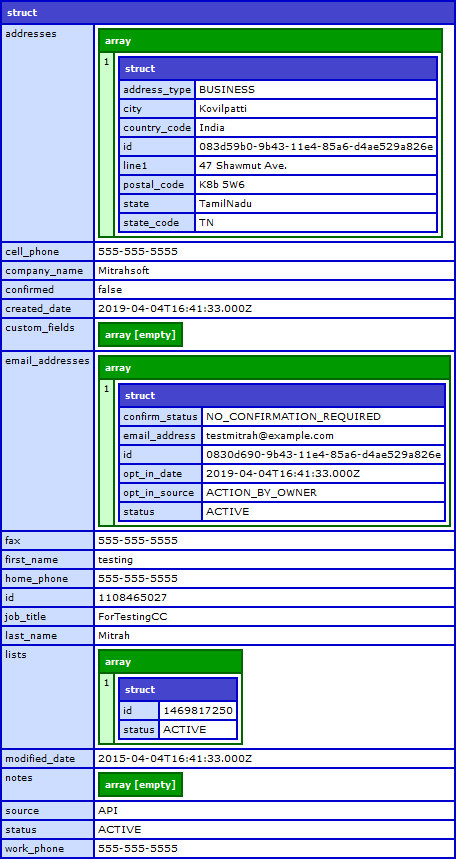
Add New Contact
To create a new contact, the contact must have an email address and be assigned to a contact list. But we need to identifies who originated the action of adding the contact. For this we'll using the extra argument to add contact as account or subscriber.
Use this below endpoint to create (POST) a new contact.
POST: https://api.constantcontact.com/v2/contacts
Parameters Used in Add New Contact
| Parameters | Values | Description |
|---|---|---|
| action_by | ACTION_BY_OWNER(default) or ACTION_BY_VISITOR |
The following values are we need to use:
|
| api_key | REQUIRED; The API key for the application API_key. | |
| Request Body | JSON Values of Contact Details | JSON Request Body for the Application. |
Example JSON Request Body
<cfscript>

// Add Contact into constantcontact using ColdFusion
bodyData = {
	"lists": [{
		"id": "1469817250"
	}],
	"job_title": "ForTestingCC",
	"last_name": "Mitrah",
	"work_phone": "555-555-5555",
	"first_name": "testing",
	"company_name": "Mitrahsoft",
	"cell_phone": "555-555-5555",
	"confirmed": "false",
	"addresses": [{
		"city": "Kovilpatti",
		"postal_code": "K8b 5W6",
		"address_type": "BUSINESS",
		"line1": "47 Shawmut Ave.",
		"country_code": "India",
		"state_code": "TN"
	}],
	"home_phone": "555-555-5555",
	"email_addresses": [{
		"email_address": "testmitrah@example.com"
	}],
	"fax": "555-555-5555"
};

addContact = APPLICATION.objCC.addContacts(
	accessToken = '<YOUR_ACCESS_TOKEN>',
	bodyData = serializeJSON( bodyData )
);
writeDump( addContact );
abort;
</cfscript>
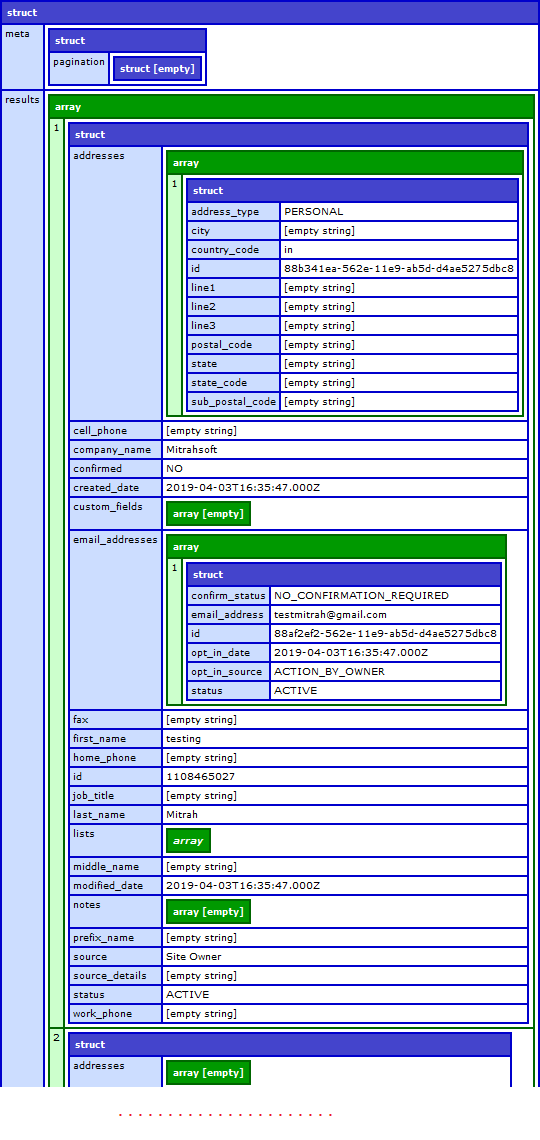
Example Response
Get Contacts
Gets one or more contacts in the account, depending on the query parameters used:
- All contacts in a user's account (no query parameters used)
- A specific contact specified by the
emailquery parameterURL encodethe email address, as with all query parameters values, to ensure proper system response.- The API is not able to return a contact by email address call if a contact's email address has been deleted in the product UI
- Only the contacts that have been modified on or after the
date/timespecified by themodified_sincequery parameter. This is useful for syncing contacts across applications. - Only the contacts with a status specified by the
statusquery parameter
GET: https://api.constantcontact.com/v2/contacts
| Parameters | Values | Description |
|---|---|---|
| api_key | REQUIRED; The API key for the application API_key. | |
| Email address for the particular contact | specify the EXACT contact by email address to retrieve information. | |
| limit | 1 - 500 default(50) | Specifies the number of results displayed per page of output. |
<cfscript>
// Get all contacts from a constantcontact list using ColdFusion
getContact = APPLICATION.objCC.getListContacts(
	accessToken = '<YOUR_ACCESS_TOKEN>',
	listId = '1469817250'
);
writeDump(getContact);abort;
</cfscript>