


Cross-site scripting:
Cross-site scripting (XSS) is a type of computer security vulnerability typically found in web applications. XSS enables attackers to inject client-side scripts into web pages viewed by other users. A cross-site scripting vulnerability may be used by attackers to bypass access controls such as the same-origin policy.
- Ref : Wikipedia
Antisamy:
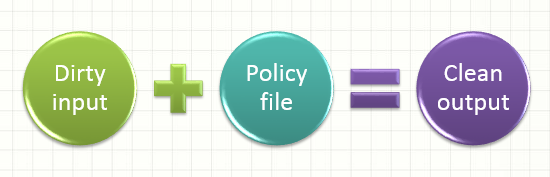
How do you protect your code from Cross Site Scripting (XSS), when your business requirements state that the user must be able to input HTML? This can be a difficult problem to solve and XSS is very difficult to filter against because there are hundreds of attack vectors. One way is to use any one of the industry standard Java Library ( AntiSamy, JSOUP..etc ) instead of wrote our own custom XSS filtering CFML code. We (at MitrahSoft) prefer to use AntiSamy because of it's flexibility, wide spread usage & support. AntiSamy uses a XML policy file that defines what HTML tags and attributes can be allowed in your application.
isSafeHTML:
Adobe ColdFusion & Lucee provides various build in security functions to handle various security attacks like Cross-Site Request Forgery (CSRF) attacks..etc. Adobe ColdFusion introduced isSafeHTML function in ColdFusion 11 release. This function validates for allowed HTML according to the rules specified in the antisamy policy file. This can be used to prevent unwanted user supplied HTML being used in an application. but this function is not yet implemented in Lucee
Syntax:
IsSafeHTML(inputString [, policyFile])
Returns:
- It returns boolean value.
- Returns false if the input violates the allowed HTML rules.
Parameter:
- inputString - Required. The string to be validated.
- PolicyFile - Optional. File path for custom AntiSamy policy file. Can be defined in the application scope or if not defined will use ColdFusion server default(coldfusion/lib/antisamy-basic.xml ).
Adobe ColdFusion Example:
<cfset goodHtmlFormat = "<p>Welcome to all</p>">
<cfsavecontent variable="wrongHtmlFormat">
    <div onmouseover="alert(1)">
</cfsavecontent>
<cfoutput>
	#isSafeHTML(goodHtmlFormat)#  <!--- Result: Yes --->
	#isSafeHTML(wrongHtmlFormat)# <!--- Result: No --->
</cfoutput>- This function requires Adobe ColdFusion 11 and up. Not supported on Lucee.
- To achieve the above example function in lucee, you need to add AntiSamy jar files and refer the following example.
Invoking AntiSamy from Lucee:
- AntiSamy requires a couple of jar files, in order to use it's
scan&getCleanHTMLmethods in ColdFusion. You need to add the JAR files to your java classpath or can use JavaLoader library. - JavaLoader which allows us to dynamically load jar files, without modifying the java classpath variables, or copying files to particular locations.
- You can get the antisamy jar files here: Download
- Using AntiSamy in lucee is actually quite simple, you just need to create an instance of the Java object org.owasp.validator.html.AntiSamy and then invoke the scan(htmlContent, policyFileLocation) method. It returns a CleanResults object which has a bunch of some methods, such as getCleanHTML() which returns sanitized HTML based on your policy.
- AntiSamy requires a couple of jar files, in order to use it's
Lucee Example:
<cfsavecontent variable="wrongHtmlFormat">
    <div onmouseover="alert(1)">Hello world</div>
</cfsavecontent>

<cfset policyFile = ExpandPath("./antisamy-slashdot-1.4.1.xml")>

<cfset jarArray = [
    ExpandPath("lib/antisamy-bin.1.4.1.jar"),
    ExpandPath("lib/antisamy-required-libs/batik-css.jar"),
    ExpandPath("lib/antisamy-required-libs/batik-util.jar"),
    ExpandPath("lib/antisamy-required-libs/nekohtml.jar"),
    ExpandPath("lib/antisamy-required-libs/xercesImpl.jar")
]>

<!--- using Java Loader to avoid adding jar files to classpath --->

<cfset classLoader = CreateObject(
    "component",
    "lib.javaloader.JavaLoader"
).init(jarArray)>

<cfset antiSamy = classLoader.create(
    "org.owasp.validator.html.AntiSamy"
).init()>

<cfset goodResultExample = antiSamy.scan(
    goodHtmlFormat,
    policyFile
)>

<cfset wrongDataExample = antiSamy.scan(
    wrongHtmlFormat,
    policyFile
)>

<cfoutput>
    #goodResultExample.getCleanHTML()# <br/>
    #wrongDataExample.getCleanHTML()# <br/>
</cfoutput>
Policy File:
You can define parsing rules here that will be used for each tag individually. The following section shows what happens to tags according to what actions AntiSamy has decided to perform on it.
For example,
- If you want to validate span tag means, you can add the following code in antisamy-slashdot-1.4.1.xml.
<tag name="span" action="validate">- If you want to remove a span tag means, you can remove the following code in antisamy-slashdot-1.4.1.xml.
<tag name="span" action="remove">- remove - Will remove entire tag when it encountered.
- validate - Validate the tag attributes based on defined rules.
remove:
Behavior when the tag-rule action is set to "remove" for given tag. Tag is deleted with all of its child text.
validate:
Behavior when the tag-rule action is set to "validate" for given tag. Verify that its attributes and children elements follow rules defined in policy file.
Some methods of CleanResults():
getCleanHTML():
- Return the filtered HTML as a String.
- A String object which contains the serialized, safe HTML.
getStartOfScan():
- Return the time when scan started.
- A Date object indicating the moment the scan started.
getEndOfScan():
- Return the time when scan finished.
- A Date object indicating the moment the scan finished.
- Return the time elapsed during the scan.
- A double primitive indicating the amount of time elapsed between the beginning and end of the scan in seconds.
addErrorMessage():
- Add an error message to the aggregate list of error messages during filtering.
- Return a list of error messages.
- An ArrayList object which contain the error messages after a scan.
getNumberOfErrors():
- Return the number of errors encountered during filtering.